Limbus Company Schemacraft Guide: How to Unlock It, Starting Teams, Dice Rolls, Rewards and the Schemacraft Pass
Project Moon has just added its most ambitious new mode in a long time, and many Managers are still figuring out how it works. This Limbus Company Schemacraft guide explains how to unlock the Schemacraft Beta, how to build your starting team, how dice rolls and Schema Deformation work, what the automated combat expects from you, which rewards to take and how the Schemacraft Pass works. The guide reflects the Schemacraft Beta as released with the November 26, 2026 (KST) scheduled update, version 1.120.0. Because this is a beta mode that Project Moon plans to adjust after player surveys, some rules and values may change.
What Is Schemacraft in Limbus Company?
Schemacraft is a run-based mode in which you recruit Identities and E.G.O as you move through a map of nodes, then fight Encounters using a new auto-battle feature. Instead of planning each Clash turn by turn, you build the team, set its deployment order and defense behaviour, and decide when to use E.G.O. Project Moon has described the mode as long-term endgame content focused on deckbuilding.
- Where to find it: The Schemacraft button is on the Drive tab.
- Cost: Schemacraft Beta does not cost any Enkephalin or Enkephalin Modules.
- Limbus Pass: Playing Schemacraft does not raise your Limbus Pass level or EXP, and it does not count toward Limbus Pass Missions. The mode has its own Schemacraft Pass instead.
- Leaving a run: Select “Pause and Exit” to leave. You can later continue that run with the same deck or restart with a new Team.
How to Unlock Schemacraft in Limbus Company
To unlock the Schemacraft Beta, you need to clear all Stages of Chapter 9.5 “Mnestic Experience” and Chapter 10 “The Gaze Bearing”. If the button on the Drive tab is still locked, check both chapters for any uncleared Stage.
Building Your Starting Team: Manual vs Randomized
Every run begins by spending a starting Cost to pick up to 4 Sinners and their Identities. Each Identity has its own Cost, which depends on its release date and rarity. You can choose between two ways to start:
- Manual Team: You choose the Identities yourself with a starting Cost of 6.
- Randomized Team: The game automatically equips Identities within a starting Cost budget of 10, which is 4 more than a Manual Team. Randomized Teams also earn 40% more Schemacraft Pass EXP.
- Reshuffle: You can reshuffle a Randomized Team 3 times between each daily reset. Certain progress milestone options in a completed run can recharge the Reshuffle function, but the total can never exceed 3.
Your account collection still matters inside Schemacraft. Identities you own can be upgraded up to Uptie 4 during a run, while Identities you do not own can only reach Uptie 3. E.G.O you own use your current Threadspin tier, and unowned E.G.O are applied at Threadspin Tier 1. Collaboration-limited E.G.O you never obtained will not appear at all.
Dice Rolls, Schemas and Schema Deformation Explained
Movement between rooms is decided by a dice roll. The dice rolls a number from 1 to 3, and that number is the upper limit of how many nodes, called Representations, you may travel. Each room can contain a combat Encounter or a Respite.
The key rule to remember: every roll after the 5th roll in each Schema zone gives the enemies empowering effects called Schema Deformation. Wasting rolls on detours therefore makes later fights harder, so plan your route through each Schema before you start rolling. A full run goes through five Schemas and ends with the final boss on Schema 5.
How Combat Works in Schemacraft
Combat Progression in Schemacraft is automated. Each ally and enemy acts in an order determined by its Speed range, using Attack Skills to Clash or make Unopposed Attacks and Defense Skills according to its Defense Strategy. A shared turn ends once every unit has acted at least once, and faster units can act several times within one shared turn. All effects follow this shared turn count.
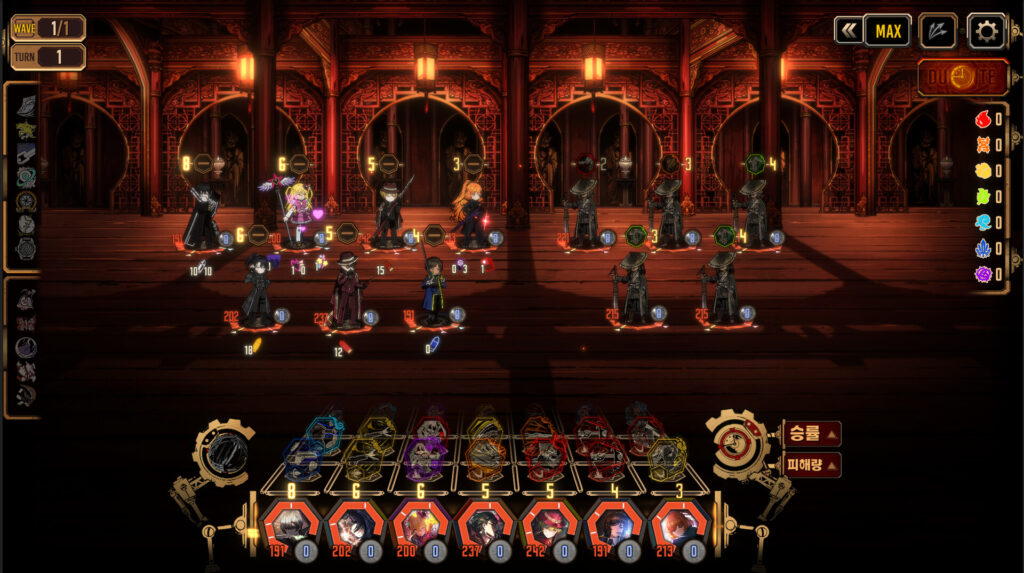
Schemacraft uses Limbus Company’s familiar Sinners and Skills, but fights play out automatically.
Before and during each fight, these are the systems you actually control:
- Combat preview: Before each battle, you can see the possible Reward Packs and the average level of the featured enemies. Elite Encounters give better rewards, but their enemies receive empowering effects.
- Deployment Order: You can rearrange it before every Encounter, and you cannot start a fight until every Sinner in your roster has a Deployment Order. Encounters begin with 4 allied Identities, and your team slowly expands to up to 8 fielded Identities plus 4 Backup Units.
- SP between fights: Sinners keep their SP from one Encounter to the next. Sinners defeated in an Encounter start the next one at 0 SP, while Backup Identities receive bonus SP when they enter.
- Defense Strategy: Each Identity uses Defense Skills automatically according to its own setting and follows the Default setting unless you change it. Buttons at the bottom of the screen (“Set All to Default”, “Apply Selected Identity’s Settings to All” and “No One Defends”) update every Sinner at once.
- Briefing: Shows both sides’ average level, the number of initial enemies and reinforcements, their levels and weaknesses, and how many E.G.O resources your Identities can generate compared to what your E.G.O need.
Using E.G.O and Retries in Schemacraft
E.G.O resources do not carry over between battles. At the start of each battle, you gain E.G.O resources for each Affinity equal to the number of Attack Skills of that Sin Affinity divided by 2, rounded down. This counts every Identity in your Team, including Backup Units. Sapling of Light abilities cannot be used in Schemacraft battles.
- Click or tap an E.G.O icon to queue it. Its target is selected automatically.
- Click or tap a queued E.G.O again to cancel it.
- Drag an E.G.O icon onto an enemy to target that enemy.
- Drag an E.G.O icon downward to Overclock it.
If a fight goes badly, you can retry or forfeit the stage from the battle menu. Each battle allows up to 2 retries, and forfeiting also uses up 1 retry. Losing or forfeiting with no retries left ends your Schemacraft run, so do not burn retries casually. After every fight, the Battle Report shows a detailed breakdown of how it went.
Schemacraft Rewards: Reward Packs, Slivers and Representations
After winning a battle, you choose a Reward Pack. Each pack is named after a Keyword, faction or Sinner and guarantees at least 1 matching Identity. If none of the offered packs fit your team, you can spend a Reshuffle to replace one. Inside a pack from a Regular Encounter, you pick the indicated number of rewards:
- Team: Recruits the Identity to your team, or replaces that Sinner’s current Identity. A duplicate Identity raises its Uptie Tier by 1 or sets it to the Uptie Tier shown on the reward, whichever is higher.
- Sliver: Converts the reward into 1 to 3 Slivers for that Sinner, based on the reward’s Uptie Tier. If that Sinner has already reached the Uptie cap, you get Universal Slivers instead.
- E.G.O: Goes into the matching Risk Level slot of a Sinner on your team. If that Sinner is absent, the E.G.O is stored.
Other node types work differently:
- Elite Encounter: Grants an Elite Reward. Choose Replace Identity, Recruit Identity, or Upgrade, which gives 3 Slivers to a Sinner already on the team.
- Boss Encounter: Choose between 2 reward options, which can offer Reshuffles, Uptie Tier increases or Universal Slivers. Each option also adds a choice of a Sinner Pack or a Random Pack. The options can vary by Schema.
- Temptation: Get specific Identities and E.G.O at the cost of 0 to 2 of your remaining dice rolls. If you do not have enough rolls left, Deformation is applied instead.
- Event: Choose beneficial effects that come with drawbacks strengthening the enemies. After you clear the boss of Schema 5 once, extra Events with special choices become available. Project Moon itself notes that passing without picking anything can be a sound strategy.
- Respite: Pick 1 of 3 options: more Reshuffles, an Uptie Tier increase for 1 Identity, or Bonus Rolls, which carry over to the next Schema. You can also spend Universal Slivers here to Uptie an Identity of your choice. Uptie is capped at Uptie 3 in Schemas 1 to 3 and Uptie 4 in Schemas 4 and 5.
How a Schemacraft Run Ends and How the Schemacraft Pass Works
There are three ways a run ends: you clear the final boss on Schema 5, you lose an Encounter with 0 retries remaining, or you choose “Forfeit Schemacraft Run” in the options menu. The Final Battle Results screen then shows the Identities you used, your damage tally and the Schemacraft EXP you gained.
- Schemacraft Pass EXP depends on your Encounter results. Higher Schemacraft zones and more difficult Encounters give more EXP, and starting with a Randomized Team adds a 40% bonus.
- You can earn up to 1,000 Schemacraft Pass EXP per week. The cap resets every Thursday at 06:00 (KST), and EXP cannot be gained past the currently unlocked Pass level.
- At Schemacraft Pass Level 10, you receive the “Nominable Announcer Ticket [Yisang Exchange] (Schemacraft Beta)”. It lets you pick an Announcer from a limited list in the Yisang Exchange on the Extraction menu. Only Announcers released up to the end of Season 8 are included, and Walpurgis Night Announcers are excluded.
Limbus Company Schemacraft Tips for Your First Runs
Based on the official rules, this is how we would approach the mode at Gamersuniverse:
- Try a Randomized Team first: You get 4 extra Cost and 40% more Pass EXP, and you still have up to 3 Reshuffles if the first roll looks weak.
- Count your rolls: Everything after the 5th roll in a Schema strengthens enemies, and Temptation nodes spend rolls too. Bonus Rolls from a Respite carry into the next Schema, which makes them a safe pick when you expect a long route.
- Build around one Keyword or faction: Reward Packs are themed and guarantee a matching Identity, so committing to a theme early makes later packs far more useful.
- Check the Briefing every time: Enemy weaknesses and the E.G.O resource preview tell you whether your current lineup can even afford its E.G.O in that fight.
- Value Speed: Since faster units can act more than once per shared turn, Speed matters more here than in normal Stages, and Project Moon is planning changes that make Speed even more decisive (see below).
- Do not take every Event: If the drawbacks pile up or the benefit does not fit your team, skip it.
Known Issues and Planned Schemacraft Changes
Project Moon has already confirmed several changes after a rocky launch week:
- Action economy fix: Currently, an Identity’s action gauge pauses while its Skill animation plays, so Identities with short animations can sneak in extra actions. Project Moon plans to start preparing the next action a set time after the animation begins, so that Speed alone decides how often a unit acts. Using E.G.O will still not delay an Identity’s next action.
- Synergy direction changed: In a notice signed by CEO Jihoon Kim, Project Moon withdrew the synergy plan from its November 26 notice. The planned subdivision of Identity trait keywords will not be applied with this update. Instead, Schemacraft-exclusive synergies will be added to E.G.O at Threadspinning Tier 3 and will only work inside Schemacraft.
- Threadspinning inside a run: E.G.O can be Threadspun up to Tier 5 during a Schemacraft run, even E.G.O you do not own, so you will not need to upgrade them on your account just to use these synergies.
- Player survey: The first Schemacraft Beta survey is scheduled for December 3, 2026 (KST), and Project Moon says further improvement plans will follow from its results.
- Compensation: For the errors in the November 26 update, Project Moon is sending 1,000 Lunacy via the in-game Mailbox, claimable once per account until December 3, 2026, 10:00 (KST).
Limbus Company Schemacraft: Our Conclusion
Schemacraft rewards planning more than mechanical execution. Unlock it through Chapters 9.5 and 10, start with a Randomized Team, protect your dice rolls and retries, and build toward one Keyword or faction with your Reward Packs. Since the Schemacraft Beta is still being reshaped by player feedback, keep an eye on Project Moon’s notices after the December 3 survey. This guide is based on the official Project Moon notices for version 1.120.0 as of November 29, 2026.
Keep the adventure going! Check out more Gaming Guides on Gamersuniverse.
Picture Source: Project Moon